
Discover why Aqua Mail is one of the best Android email apps. Learn its features, benefits, customization options, and why millions trust it for better email management.
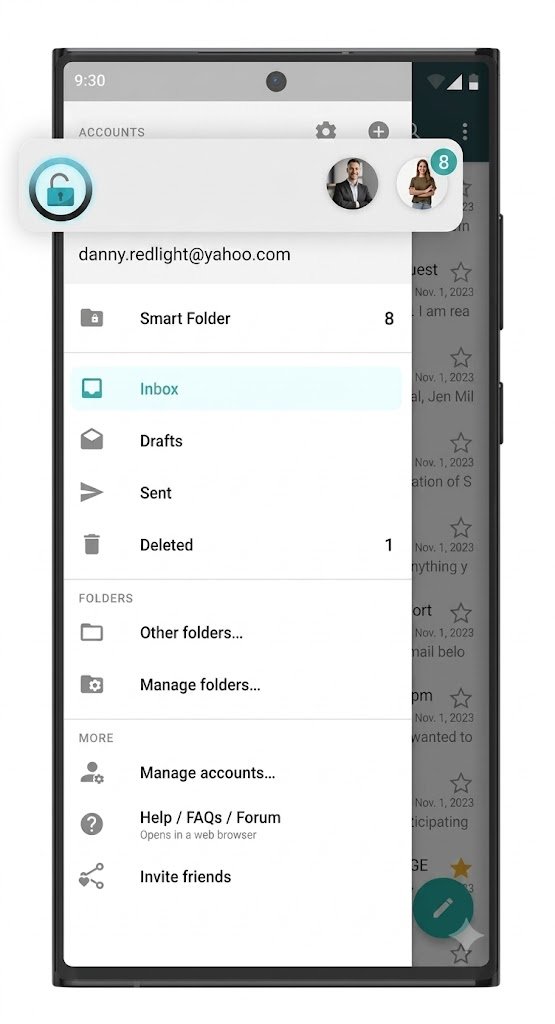
Aqua Mail: The Complete Guide to Smarter Email Management on Android
Managing email shouldn’t feel like a full-time job. Whether you’re a busy professional, student, entrepreneur, freelancer, or someone who simply wants an easier way to organize multiple email accounts, finding the right email application can completely change how productive your day becomes. Many people spend hours switching between different email apps, struggling with cluttered inboxes, delayed notifications, confusing interfaces, and limited customization. These frustrations often lead to missed opportunities, slower communication, and unnecessary stress.
This is exactly where Aqua Mail stands out. Designed specifically for Android users who want more control, flexibility, and efficiency, Aqua Mail offers an email experience that goes far beyond what standard email applications provide. Instead of forcing users into a one-size-fits-all solution, Aqua Mail gives you the freedom to customize nearly every aspect of your inbox while supporting virtually every major email provider.
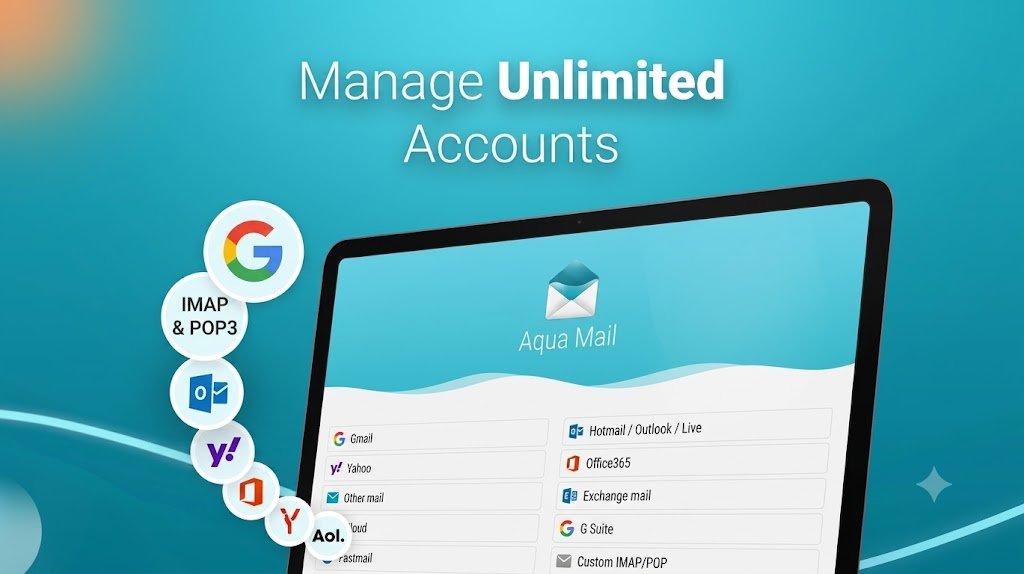
Whether you use Gmail, Outlook, Yahoo Mail, Exchange, or your own custom domain email, Aqua Mail brings everything together inside one beautifully organized application. Instead of constantly jumping between apps, you can manage all your communication from one central dashboard.
If you’ve been searching for an email app that combines speed, security, personalization, and professional features without becoming overly complicated, this guide will show you why Aqua Mail deserves serious consideration.
Why Email Management Matters More Than Ever
Email remains one of the world’s most important communication tools despite the rise of messaging apps and social media. Businesses rely on email for contracts, customer support, invoices, marketing campaigns, project collaboration, and daily communication. Students receive assignments and academic updates through email. Families share important information, travel confirmations, financial statements, and personal messages.
The average person receives dozens—sometimes hundreds—of emails every day. Without an efficient email application, inboxes quickly become overwhelming.
Common challenges include:
- Missing important emails
- Constant spam
- Multiple inboxes
- Poor organization
- Slow notifications
- Difficult search functions
- Limited customization
- Battery-draining background activity
These problems become even more frustrating when using more than one email provider.
Imagine checking Gmail for work, Outlook for your office, Yahoo for personal communication, and another account for your website. Constantly switching applications wastes time and interrupts productivity.
This is exactly the problem Aqua Mail was designed to solve.
What Is Aqua Mail?
Aqua Mail is a highly customizable Android email application that allows users to manage multiple email accounts inside one powerful interface. Rather than limiting users to one email provider, Aqua Mail supports nearly every major email service using standard protocols like IMAP, POP3, SMTP, and Exchange.
This means you can manage:
- Gmail
- Outlook
- Yahoo Mail
- Hotmail
- Exchange
- Office email
- Business domains
- Educational accounts
- Personal websites
- Private mail servers
—all inside a single application.
Instead of maintaining separate apps for every account, Aqua Mail creates one unified experience while still keeping each inbox organized.
This flexibility has made Aqua Mail a favorite among professionals, freelancers, students, and Android power users who demand more than the default email experience.
Why Most Email Apps Leave Users Frustrated
Many people simply continue using the default email application that came with their phone. While convenient at first, these apps often become frustrating as email usage grows.
Some of the biggest complaints include slow synchronization, delayed notifications, limited folder support, poor organization, lack of personalization, and minimal control over how messages are displayed.
Imagine waking up to dozens of unread emails spread across several different accounts. Instead of seeing one organized dashboard, you’re forced to open multiple applications, wait for each to sync, search for important messages, and repeat the same process every morning.
Over weeks and months, these small inconveniences add up to hours of lost productivity.
For professionals who depend on fast communication, delayed email notifications can even result in missed opportunities or unhappy clients.
Aqua Mail approaches these problems differently by giving users the tools to organize email according to their own workflow rather than forcing them into a rigid system.
How Aqua Mail Makes Email Simpler
One of Aqua Mail’s biggest strengths is its flexibility.
Rather than assuming every user has identical needs, Aqua Mail lets you build your inbox around the way you naturally work.
Need different notification sounds for work and personal email?
No problem.
Want separate signatures for different accounts?
Easy.
Prefer dark mode?
Done.
Need swipe gestures customized?
Available.
Want to prioritize business emails while muting newsletters?
Possible.
Instead of overwhelming users with complexity, these customization options are surprisingly intuitive.
After only a short setup process, most users notice that email management becomes significantly smoother.
This personalized experience is one reason why Aqua Mail has developed a loyal user base over the years.
The Power of One Unified Inbox
One of Aqua Mail’s most appreciated features is the unified inbox.
Rather than opening five different accounts individually, all important emails appear together in one organized timeline.
This doesn’t eliminate account separation—it simply gives you the option of viewing everything in one place.
Benefits include:
- Faster email review
- Less app switching
- Better productivity
- Improved organization
- Easier searching
- Fewer missed messages
- More efficient daily workflow
For busy professionals, this alone can save valuable minutes every day.
Multiply those saved minutes across weeks, months, and years, and the productivity gains become substantial.
Who Can Benefit Most from Aqua Mail?
Aqua Mail is designed for virtually anyone who relies on email, but certain users will appreciate its capabilities even more.
Business Professionals
Professionals often manage multiple work accounts while staying responsive to clients and colleagues. Aqua Mail helps keep everything organized in one place.
Entrepreneurs
Business owners juggle customer inquiries, invoices, marketing emails, supplier communication, and internal operations. Having one efficient email hub simplifies daily management.
Freelancers
Freelancers frequently communicate with multiple clients across different projects. Aqua Mail makes switching between accounts effortless while maintaining professional organization.
Students
Educational institutions increasingly rely on email for announcements, assignments, schedules, and collaboration. Aqua Mail helps students stay on top of everything from one convenient interface.
Everyday Users
Even if you only manage personal emails, Aqua Mail offers a cleaner, more customizable experience than many default email apps.
Why Customization Changes Everything
Most email applications expect users to adapt to the software.
Aqua Mail flips that philosophy.
Instead, the software adapts to the user.
From visual themes and swipe actions to notification preferences and inbox layouts, nearly every aspect of the experience can be tailored to your preferences.
This level of personalization helps reduce distractions while improving efficiency.
Over time, these small adjustments create a workflow that feels natural instead of frustrating.
Upgrade Your Email Experience Today
If you’re tired of cluttered inboxes, multiple email apps, and limited customization, Aqua Mail offers a smarter way to stay organized. Whether you’re managing one account or ten, its powerful features help streamline your communication and save valuable time.
How Aqua Mail Helps You Stay Productive Every Day
One of the biggest advantages of Aqua Mail is that it isn’t simply another email application—it is a productivity tool. Every feature is designed to reduce the amount of time you spend managing emails so you can focus on what actually matters. Whether you’re replying to customers, communicating with your employer, coordinating projects, or simply keeping in touch with family and friends, the app helps streamline your workflow from the moment you open it.
Instead of constantly searching for important messages buried beneath newsletters or promotional emails, Aqua Mail gives you the flexibility to organize your inbox exactly the way you want. Custom folders, priority notifications, color-coded accounts, and intelligent filtering work together to make email management significantly less stressful.
The result is an inbox that feels organized instead of overwhelming.
Manage Multiple Email Accounts Without the Chaos
One of the primary reasons Android users choose Aqua Mail is its excellent support for multiple email accounts. Modern users rarely have just one email address anymore. Many people have separate accounts for work, personal communication, online shopping, school, freelance projects, and business inquiries.
Without a centralized solution, checking each account individually quickly becomes exhausting.
With Aqua Mail, everything stays in one place while remaining neatly organized.
For example, imagine a freelance graphic designer who manages:
- Personal Gmail account
- Business domain email
- Outlook account for a corporate client
- Yahoo account for subscriptions
- University email account
Instead of opening five different applications several times each day, Aqua Mail allows all accounts to work together inside one interface.
Even better, users can decide whether they prefer viewing emails in a unified inbox or keeping every account separate.
This flexibility makes Aqua Mail suitable for both casual users and professionals with demanding communication needs.
Powerful Customization Makes Every Inbox Feel Personal
No two people manage email the same way.
Some prefer dark mode.
Others like large fonts.
Some swipe left to archive.
Others prefer deleting messages immediately.
Many email applications force users into a single layout with very few customization options.
Aqua Mail takes the opposite approach.
Nearly every visual and functional element can be personalized.
Some of the available customization options include:
- Light and dark themes
- Conversation view
- Swipe gestures
- Font sizes
- Signature management
- Notification sounds
- LED notification colors (supported devices)
- Inbox appearance
- Home screen widgets
- Folder synchronization
- Message previews
- Reading pane preferences
These adjustments may seem small individually, but together they create a smoother, faster, and more enjoyable email experience.
Advanced Notification Controls
Email notifications are supposed to keep us informed.
Unfortunately, many apps notify users about everything equally.
A promotional newsletter receives the same alert as an important work email.
Over time, notification fatigue causes users to ignore alerts altogether.
Aqua Mail solves this problem by allowing detailed notification customization.
For example, users can:
- Receive alerts only from work accounts.
- Silence newsletters.
- Assign unique sounds to different inboxes.
- Disable notifications during specific hours.
- Prioritize messages from important contacts.
- Customize vibration settings.
- Control synchronization intervals.
These options help users stay informed without becoming overwhelmed.
Security That Gives You Peace of Mind
Email contains some of our most valuable information.
Financial records.
Business contracts.
Personal conversations.
Travel bookings.
Medical appointments.
Account recovery emails.
Because email often acts as the gateway to many online accounts, security should never be an afterthought.
Aqua Mail supports secure authentication methods and encrypted connections for compatible email providers, helping protect your communication during transmission. Combined with Android’s built-in security features, users gain greater confidence when accessing sensitive information on their mobile devices.
For professionals handling confidential information, this added protection is especially valuable.
Designed for Speed and Reliability
Many users notice that some default email apps become sluggish as inboxes grow.
Searching thousands of messages can take several seconds.
Loading attachments may feel slow.
Notifications sometimes arrive late.
Aqua Mail has earned a strong reputation for delivering responsive performance even when managing multiple large email accounts.
Whether you’re opening attachments, composing replies, or switching between inboxes, the interface is designed to remain smooth and responsive.
For users who depend on quick communication, this responsiveness can make a noticeable difference throughout the day.
A Better Experience for Business Professionals
Business communication often demands speed, organization, and reliability.
Missing an important client email could mean losing a sale.
Forgetting to respond to a supplier could delay operations.
Delayed notifications may affect customer satisfaction.
Aqua Mail addresses these challenges by giving professionals greater control over how business communication is managed.
Professionals can:
- Separate business and personal accounts.
- Create professional email signatures.
- Organize projects using folders.
- Quickly search previous conversations.
- Prioritize client communication.
- Reduce inbox clutter.
- Manage multiple company accounts efficiently.
Instead of spending time organizing emails manually, users can focus on serving customers and growing their businesses.
Why Freelancers Love Aqua Mail
Freelancers often wear many hats.
Designer.
Writer.
Developer.
Marketer.
Customer support.
Account manager.
Each client may use different communication channels and email providers.
Keeping everything organized becomes increasingly difficult as the client list grows.
Aqua Mail simplifies this process by bringing every client account into one easy-to-manage interface.
Imagine receiving project updates from five different clients throughout the day.
Instead of switching between Gmail, Outlook, and company email portals, every important message is available inside Aqua Mail.
This convenience reduces distractions and helps freelancers respond more quickly.
Students Can Stay Organized Too
University life involves constant communication.
Assignment deadlines.
Class schedules.
Exam notifications.
Financial aid updates.
Group project discussions.
Campus announcements.
Many students underestimate how much email they’ll receive until classes begin.
Aqua Mail helps students organize academic communication while keeping personal email separate.
Color-coded accounts and customizable notifications make it easier to recognize important university messages before they get buried beneath promotional emails.
Real-World Productivity Example
Imagine Sarah, a small business owner who operates an online clothing store.
Every day she receives:
- Customer questions
- Supplier invoices
- Shipping notifications
- Marketing newsletters
- Personal emails
- Payment confirmations
Previously, she switched between three different email apps throughout the day.
Important customer inquiries occasionally slipped through the cracks.
After moving everything into Aqua Mail, Sarah organized her inbox using folders, customized notifications for customer emails, and enabled a unified inbox.
Now she spends less time checking email and more time growing her business.
This simple change improved her daily workflow without requiring expensive software or complicated training.
Why Millions Continue Choosing Aqua Mail
An email application earns loyal users by consistently delivering a dependable experience.
Over the years, Aqua Mail has built a reputation for offering extensive customization, broad compatibility with major email providers, and features that appeal to both everyday users and power users alike.
Its continued popularity reflects the value many Android users place on having greater control over how they manage their email.
While every user’s needs are different, Aqua Mail’s flexibility makes it a compelling choice for anyone looking beyond the limitations of a basic email app.
How Aqua Mail Compares to Standard Email Apps
Many default email applications focus on simplicity.
While this works well for basic users, power users often need much more.
Here’s where Aqua Mail stands out:
| Feature | Standard Email Apps | Aqua Mail |
|---|---|---|
| Multiple Accounts | Basic | Advanced |
| Unified Inbox | Limited | Yes |
| Custom Themes | Few | Extensive |
| Swipe Gestures | Limited | Fully Customizable |
| Widgets | Basic | Advanced |
| Smart Notifications | Limited | Extensive |
| Email Signatures | Basic | Multiple |
| Folder Management | Basic | Advanced |
| Personalization | Minimal | Excellent |
For users who spend hours each week managing email, these additional capabilities can significantly improve efficiency.
What Users Appreciate Most
Among the features frequently praised by long-time users are:
- Easy setup with major email providers.
- Highly customizable interface.
- Reliable support for multiple accounts.
- Unified inbox for faster email management.
- Flexible notification settings.
- Smooth performance on Android devices.
- Professional-grade organization tools.
- Clean and intuitive user experience.
These strengths have helped Aqua Mail remain a popular choice for users seeking a more capable email solution.
Take Control of Your Inbox
If your current email app is slowing you down, it may be time for a smarter solution. Aqua Mail combines flexibility, productivity, and powerful organization tools in one easy-to-use Android app.
👉 Try Aqua Mail today:
https://aquamailinc.sjv.io/oNGXnn
Tips to Get the Most Out of Aqua Mail
Simply installing Aqua Mail is only the beginning. To truly maximize its capabilities, it’s worth spending a few minutes customizing the app based on your workflow. Small adjustments can make a significant difference in how efficiently you manage your inbox every day.
Start by adding all your email accounts during the initial setup. This creates a centralized communication hub where personal, professional, educational, and business emails are accessible without switching between different applications.
Next, customize your notifications. Assign different sounds or vibration patterns to work and personal accounts so you instantly know which emails require immediate attention. This reduces distractions while ensuring you never miss an important message.
Take advantage of folders and labels to organize conversations by project, client, or category. Instead of scrolling endlessly through hundreds of emails, you’ll know exactly where to find the information you need.
Finally, personalize the interface. Whether you prefer dark mode, larger fonts, swipe gestures, or conversation view, Aqua Mail allows you to build an email experience that feels natural and comfortable.
Why Investing in a Better Email App Saves Time
People often overlook how much time they spend managing email.
Checking notifications.
Searching for attachments.
Switching between accounts.
Deleting spam.
Finding old conversations.
Replying to clients.
Reading newsletters.
These small tasks happen dozens of times every day.
If a better email application saves only ten minutes daily, that adds up to:
- 70 minutes each week
- Over 60 hours every year
That’s nearly an entire workweek saved simply by using a smarter email management solution.
For business owners, freelancers, remote workers, and students, those saved hours can be invested in more meaningful work, personal projects, or time with family.
The Future of Mobile Email Management
Mobile productivity continues to evolve as smartphones become the primary device for communication. Modern users expect more than simply sending and receiving emails—they want intelligent organization, seamless synchronization, strong security, and extensive customization.
Applications like Aqua Mail reflect this shift by providing advanced features that were once limited to desktop email clients.
As work becomes increasingly mobile and people manage multiple email identities across personal and professional life, flexible tools like Aqua Mail are becoming more valuable than ever.
Choosing an email application isn’t just about convenience anymore.
It’s about improving productivity, reducing stress, and making communication more efficient every single day.
Frequently Asked Questions About Aqua Mail
1. What is Aqua Mail used for?
Aqua Mail is an Android email application that allows users to manage multiple email accounts from one interface while offering advanced customization, organization tools, and support for many popular email providers.
2. Can Aqua Mail manage multiple email accounts?
Yes. One of Aqua Mail’s biggest strengths is its ability to manage multiple email accounts—including Gmail, Outlook, Yahoo, Exchange, and custom domains—from a single application.
3. Is Aqua Mail suitable for business users?
Absolutely. Business professionals appreciate Aqua Mail for its unified inbox, customizable notifications, multiple signatures, folder organization, and efficient account management.
4. Does Aqua Mail support custom email domains?
Yes. Aqua Mail supports many email services that use standard protocols such as IMAP, POP3, SMTP, and Exchange, making it compatible with many business and personal domains.
5. Why should I choose Aqua Mail over a default email app?
Unlike many default email apps, Aqua Mail offers greater customization, better organization, extensive notification controls, advanced account management, and a highly personalized user experience.
6. Is Aqua Mail easy to set up?
Yes. Most users can quickly connect their email accounts by following the setup instructions, making it easy to start managing all of their emails from one convenient location.
Helpful Resources
Internal Links (Replace with your actual URLs):
- How to Organize Your Inbox
- Best Productivity Apps for Android
- Tips for Managing Multiple Email Accounts
These authoritative resources can provide readers with additional information about email productivity, digital communication, and workplace efficiency.
Final Thoughts: Is Aqua Mail Worth It?
If you’re frustrated by cluttered inboxes, slow email apps, or the hassle of juggling multiple accounts, Aqua Mail offers a practical solution that puts you back in control. Its combination of customization, organization, and support for a wide range of email providers makes it an excellent choice for professionals, students, freelancers, entrepreneurs, and everyday Android users alike.
Rather than adapting your workflow to fit a limited email app, Aqua Mail lets you shape the experience around your own needs. From unified inboxes and personalized notifications to advanced organization features, it helps transform email from a daily frustration into a streamlined productivity tool.
Whether you’re handling business communications, managing school assignments, or simply trying to keep personal emails organized, investing in a capable email client can save you valuable time and reduce unnecessary stress.
Upgrade Your Email Experience Today
Don’t let an outdated email app slow you down. Join the millions of Android users who have chosen Aqua Mail to simplify their inboxes, improve productivity, and stay connected with confidence.
👉 Get Aqua Mail now:
https://aquamailinc.sjv.io/o
[Earnixor]